Tiempo, Zona Horaria
English
Français
Deutsch
Español
日本語
繁體
简体
Português
Italiano
Русский
Tiempo , Tiempo , Zona Horaria , Horario Mundial , Reloj
Area
América del Norte
Anguila
Antigua y Barbuda
Bahamas
Barbados
Belice
Bermudas
Islas Vírgenes Británicas
Canadá
Islas Caimán
Costa Rica
Cuba
Curaçao
Dominica
República Dominicana
El Salvador
Granada
Guadalupe
Guam
Guatemala
Honduras
Jamaica
México
Montserrat
Nicaragua
Islas Marianas del Norte
Panamá
Puerto Rico
San Cristóbal y Nieves
Santa Lucía
San Pedro y Miquelón
San Vicente y las Granadinas
Islas Turcas y Caicos
EE.UU.
Islas Vírgenes de EE.UU.
América del Sur
La Argentina
Aruba
Bolivia
Brasil
Chile
Colombia
Ecuador
Islas Malvinas
Guayana Francesa
Guyana
Paraguay
Perú
Uruguay
VenezuPela
Venezuela
Europa
Albania
Andorra
Armenia
Austria
Bielorrusia
Bélgica
Bosnia
Bulgaria
Croacia
Chipre
República Checa
Dinamarca
Estonia
Islas Feroe
Finlandia
Francia
Alemania
Gibraltar
Grecia
Hungría
Islandia
Irlanda
Italia
Kosovo
Letonia
Liechtenstein
Lituania
Luxemburgo
Macedonia
Malta
Moldova
Mónaco
Montenegro
Países Bajos
Noruega
Polonia
Portugal
Rumania
Rusia
San Marino
Serbia
Eslovaquia
Eslovenia
España
Suecia
Suiza
Turquía
Reino Unido
Ucrania
Ciudad del Vaticano
Australia Pacífico
América Samoa
Australia
Islas Cocos
Islas Cook
Fiji
Polinesia Francesa
Kiribati
Islas Marshall
Micronesia
Nauru
Nueva Zelanda
Niue
Isla Norfolk
Palau
Papúa Nueva Guinea
Islas Pitcairn
Islas Salomón
Tonga
Tuvalu
Vanuatu
Wallis y Futuna
Asia
Afganistán
Azerbaiyán
Bahrein
Bangladesh
Bután
Brunéi
Camboya
China
Franja de Gaza
Georgia
Hong Kong
La India
Indonesia
Irán
Iraq
Israel
Japón
Jordania
Kazajstán
Kuwait
Kirguistán
Laos
Líbano
Macao
Malasia
Mongolia
Myanmar
Nepal
América del Norte Corea
Omán
Pakistán
Filipinas
Qatar
Arabia Saudí
Singapur
Corea del Sur
Sri Lanka
Siria
Taiwán
Tayikistán
Tailandia
Timor
Turkmenistán
Emiratos Árabes Unidos
Uzbekistán
Vietnam
Cisjordania
Yemen
África
Argelia
Angola
Benín
Botswana
Burkina Faso
Burundi
Camerún
Cabo Verde
República Centroafricana
República eo Tchad
Comoras
Congo
República Democrática del Congo
Costa de Costa de Costa de Marfil
Djibouti
Egipto
Guinea Ecuatorial
Eritrea
Etiopía
Gabón
Colombia
Argentina
Kenia
Lesotho
Liberia
Libia
Madagascar
Malawi
Malí
Mauritania
Mauricio
Mayotte
Marruecos
Mozambique
Namibia
Níger
Nigeria
Reunión Francés
Ruanda
Santa Helena
Santo Tomé y Príncipe
Senegal
Seychelles
Sierra Leona
Somalia
Sudáfrica
Sudán
Suazilandia
Tanzania
Togo
Túnez
Uganda
Sáhara Occidental
Zambia
Zimbabue
Kitchener - Kitchener Tiempo , Tiempo , Zona Horaria , Horario Mundial , Reloj
Zona normal de hora:
UTC/GMT-5
Horario de verano:
1 hora
zona horaria actual:
UTC/GMT-4
Zona Horaria:
EDT
Instalar Timezone Herramienta!
Pulse el botón copiar y pegar en tu blog o sitio web.
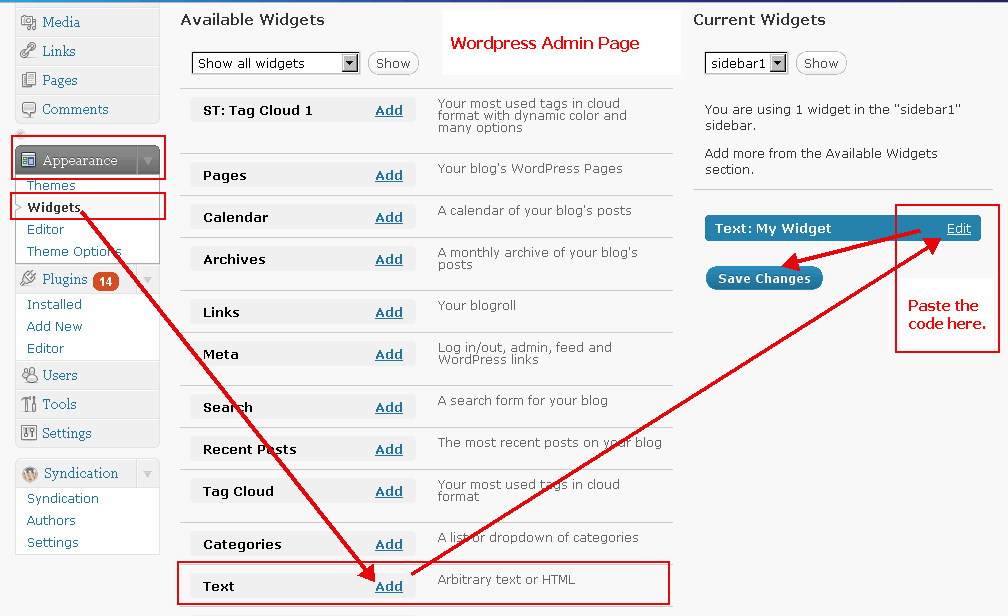
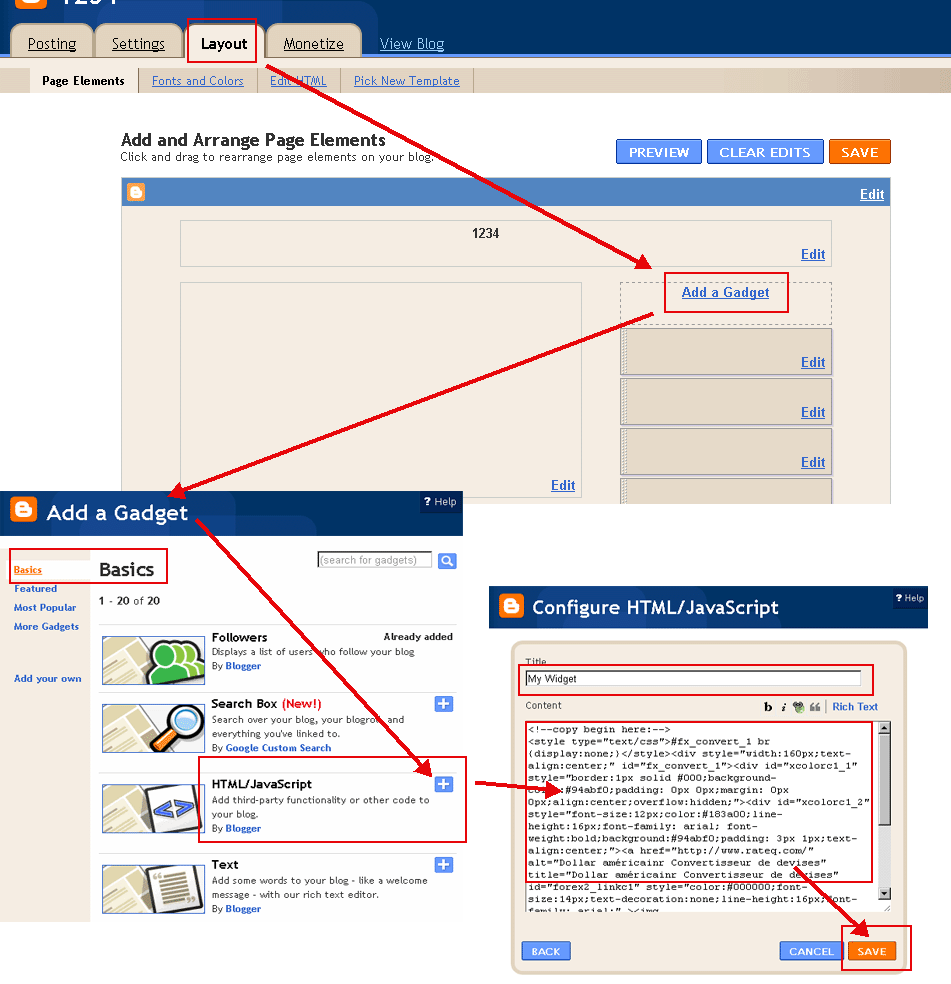
(Por favor, cambiar a 'HTML' al modo de desplazamiento en su blog. Ejemplos:
Ejemplo WordPress
,
Ejemplo Blogger
)
Seleccione Color(
?
):
Color de fuente(
?
):
Formato de la fecha:
May 21 2018 10:23:39 AM
21 May 2018 10:23:39 AM
5/21/2018 10:23:39 AM
21/5/2018 10:23:39 AM
2018/5/21 10:23:39 AM
2018-5-21 10:23:39 AM
May 21 2018 Lunes 10:23:39 AM
21 May 2018 Lunes 10:23:39 AM
5/21/2018 Lunes 10:23:39 AM
21/5/2018 Lunes 10:23:39 AM
2018/5/21 Lunes 10:23:39 AM
2018-5-21 Lunes 10:23:39 AM
2018 5 21 Lunes 10:23:39 AM
Lunes, May 21 2018 10:23:39 AM
Lunes, 21 May 2018 10:23:39 AM
Lunes May 21 2018 10:23:39 AM
Lunes 21 May 2018 10:23:39 AM
Kitchener Tiempo
Copiar al portapapeles
<!--copy begin here:--> <style type="text/css">#fx_convert_1 br {display:none;}</style><div style="width:210px;text-align:center;" id="fx_time_1"><div id="xcolorc1_1" style="border:1px solid #000;background-color:#94abf0;padding: 0px 0px;margin: 0px 0px;align:center;overflow:hidden;"><div id="xcolorc1_2" style="font-size:12px;color:#183a00;line-height:16px;font-family: arial; font-weight:bold;background:#94abf0;padding: 3px 1px;text-align:center;"><a href="http://es.timeq.org/Kitchener" alt="Kitchener - Kitchener Tiempo" title="Kitchener - Kitchener Tiempo" id="xtime_link1" style="color:#111111;font-size:14px;text-decoration:none;line-height:16px;font-family: arial;" >Kitchener Tiempo</a></div><div id="clockesKitchener1" style="color:#111111;font-size: 1em;font-family: arial; font-weight:bold"></div><script src="http://es.timeq.org/z.php?z=America/New_York&id=clockesKitchener1&t=1"></script></div></div> <!--copy end here:-->
Seleccione Color(
?
):
Calendario
<<
>>
Do
Lu
Ma
Mi
Ju
Vi
Sá
Calendario|Tiempo
Copiar al portapapeles
<!--copy begin here:--> <style type="text/css">#mort_cal_1 br {display:none;} #calendar123 td.onToday{color:#ff0000;}</style><div style="width: 160px;text-align:center;"><div style="border:1px solid #000;background-color:#fefefe;color:#333333;padding: 0px 0px;margin: 0px 0px;align:center;text-align:center;overflow:hidden;"><div id="xcolorcs1_1" style="font-size:12px;color:#173a00;line-height:16px;font-family: arial; font-weight:bold;background:#94abf0;padding: 3px 1px;text-align:center;"><a href="http://es.timeq.org/" alt="Calendario|Tiempo" title="Calendario|Tiempo" id="gooddaycal_link" style="color:#000000;font-size:14px;text-decoration:none;line-height:16px;font-family: arial;" ><img src="http://es.timeq.org/day.gif" border="0" style="margin:0;padding:0;border:0;" />Calendario</a> </div><DIV style="font-size:16px;"><DIV id=calendar123prev style="float:left;cursor:pointer;padding-left:5px;"><<</DIV><DIV id=calendar123next style="float:right;cursor:pointer;padding-right:5px;">>></DIV><SPAN id=calendar123year></SPAN> <SPAN id=calendar123month></SPAN> <TABLE cellSpacing=0 style="padding-left:12px;"><THEAD><TR><TD><font style='color:red;font-size:14px;'>Do</font></TD><TD style='font-color:black;font-size:14px;'>Lu</TD><TD style='font-color:black;font-size:14px;'>Ma</TD><TD style='font-color:black;font-size:14px;'>Mi</TD style='font-color:black;font-size:14px;'><TD>Ju</TD><TD style='font-color:black;font-size:14px;'>Vi</TD><TD><font style='color:red;font-size:14px;'>Sá</font></TD></TR></THEAD><TBODY id=calendar123></TBODY></TABLE><INPUT id=calendar123prevyear type=button value='<<<'><INPUT id=calendar123today type=button value='Hoy'><INPUT id=calendar123nextyear type=button value='>>>'></DIV><script type="text/javascript" src="http://es.timeq.org/z2.php"></script></div><a href="http://es.timeq.org/" alt="Calendario|Tiempo" title="Calendario|Tiempo" id="gooddaycal_link2" style="font-size:12px;text-decoration:none;line-height:16px;font-family: arial;align:center;" >Calendario|Tiempo</a></div> <!--copy end here:-->
Kitchener - Kitchener Información y Noticias:
 Calendario